Dynamic content and expressions
So far you used data as it comes in. With an expression you calculate something with it. You put today's date in front of the name of every attachment your flow saves.
What do you need? The flow Save attachments from lesson 2.
Dynamic content and expressions
Dynamic content is data that an earlier step passes on, such as the name of an attachment. You pick it from a list. An expression is a small formula that calculates something, such as today's date. You type it in the expression editor.
Here is how to get there: click in a field. Two buttons appear next to the field. The lightning bolt opens the list of dynamic content. The fx button opens the expression editor, where you type a formula. Both put the result in the field as a chip.
The result of this lesson: invoice.pdf is saved as 2026-10-04_invoice.pdf. That sorts nicely by date.
Step by step
-
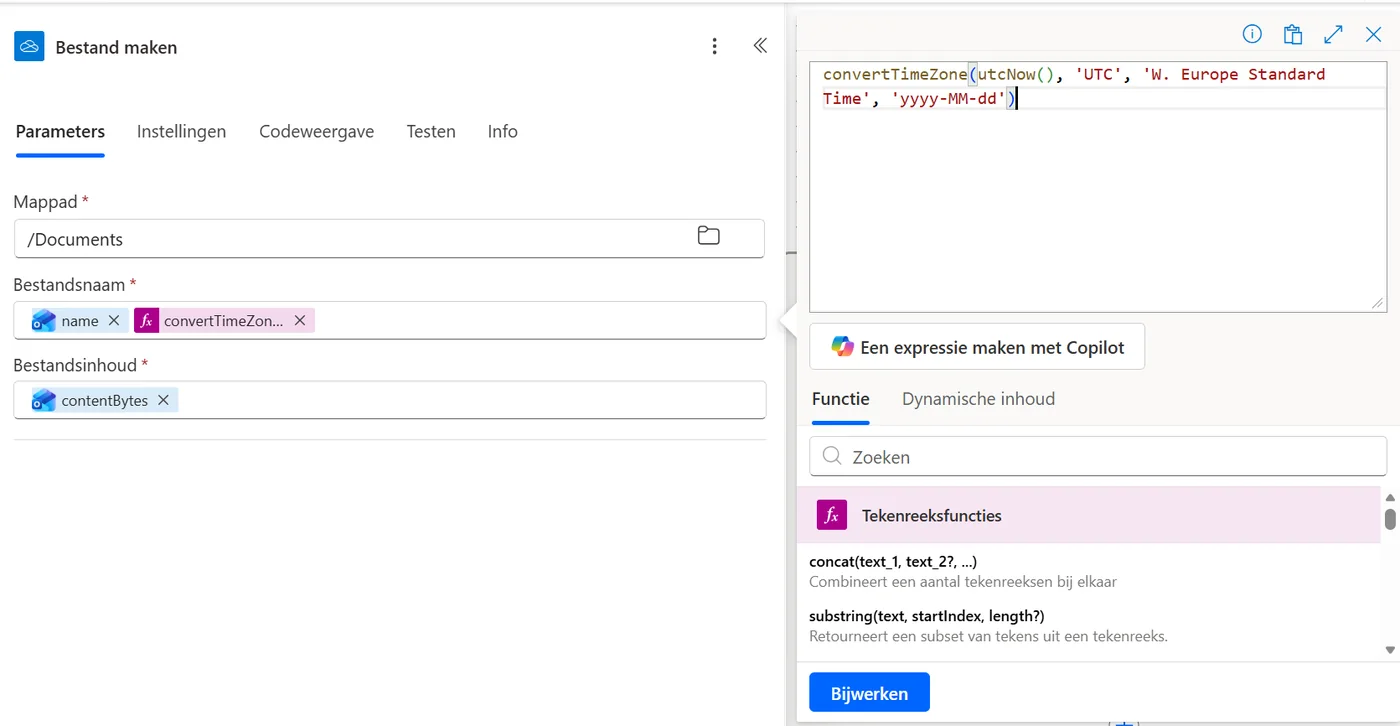
Type the formula on the expression tab. Tap the image to enlarge. It shows the Dutch interface.
Why convertTimeZone? The function utcNow() returns the time in UTC. Without converting, the date can be a day off around midnight in your time zone. Error when adding? Check that all brackets and quotation marks match. It is best to copy the formula.
Last updated: